Showing posts with label flower. Show all posts

Wednesday, March 13, 2013

Sexy Lily

Now that I have your attention ...


Is that a pistil in your pocket or are you just happy to see me?
This reminds me of my daughter's junior high school's art show and sale. She had sculpted a larger-than-life hibiscus flower that also functioned as a table lamp. It was gorgeous and I'm not just saying that because I'm her mother and I like flowers. During the show, someone (probably the teacher), draped a scarf over part of the lamp. I guess she was getting tired of all the giggles and lewd comments. The lamp sold before I could get my bid in!

I went into Photoshop and put a layer of text on the pic.


Impact Font

Then I thought I'd go to www.cheezburger.com and here is the "I Can Has Cheezburger" version I created:


and this is the link to my cheezburger creation with my name on it and everything.

I still want to play around in Photoshop to try to recreate this because I want to practice, but Cheezburger does it all for you! Cheezburger is so much easier.

I made another version after I created a cheezburger account.


and this is the link to the other cheezburger version I made (under my account this time)

It definitely belongs under "So Much Pun".

Monday, March 11, 2013

Stargazer Lily Makes a Great Subject for Filter Fun

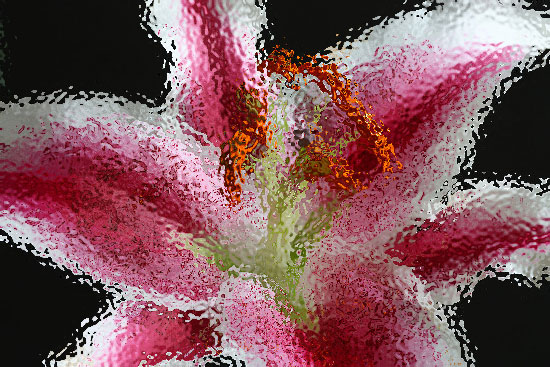
The effects of the various filters available in Photoshop show up really well on a single subject. I had seen a Stargazer Lily being used in one of my reference books and I thought I'd like to try it out myself. Here are some interesting filters that I applied (in alphabetical order):

Under Filter>Artistic:

Coloured Pencil
Paint Daubs
Plastic Wrap
Rough Pastels
Smudge Stick
Sponge
Watercolour
Under Filter>Brush Strokes:
Ink Outlines
Under Filter>Distort:
Diffuse Glow
Glass

Under Filter>Pixellate:
Mosaic

Pointilize
Under Filter>Render:
Difference Clouds
Under Filter>Sketch:
Chalk and Charcoal
Under Filter>Stylize:
Emboss
Glowing Edges
Solarize
Under Filter>Texture:

Craquelure
Craquelure refers to the hairline surface cracking of paintings into characteristic texture patterns determined by climate conditions and materials used in the creation of the painting. In the 18th century, Craquelure was so popular that to English painters it became known as Craquelure anglaise. Today, forgers and restorers often imitate it to enhance the look of authenticity in their works.
Patchwork
Stained Glass


Variations of a Summer Bouquet

Photoshop's Impressionist Brush sounded interesting to me so I opened up a pic that I took last summer and tried it out. The Impressionist Brush tool is similar to some of the Artistic and Brush Stroke filters, but instead of selecting the entire pic, one can "paint" over just certain parts.

Original
This is what happens when you use the Impressionist Brush from the Toolbox:
"Paint" over the pic with the Impressionist Brush
This reminds me of  a watercolour
I thought I'd try out a few filters while I had the file open and here are a few of my favourites:
Artistic>Palette Knife
I'd like to print this on canvas just as is
Artistic>Poster Edges (maximum settings)

Artistic>Poster Edges (minimum settings)
I like this one better
Posterized - Level 4
This is quite a lot more dramatic than the next one which was at a lower level

Posterized - Level 2
Brush Strokes>Sumi-e
Sumi-e is a classical Asian ink painting that focuses on simple lines and open space. This does not look like sumi-e but I like it.

Hell! I'm Not Boring!

Unlike other droopy Hellebores I've tried to capture, this beauty seems to be lifting its face towards the sun.

Original

Posterized
How to Posterize:

Select Layer>New Adjustment Layer>Posterize

Note: Other options under New Adjustment Layer are: Levels, Brightness/Contrast, Hue/Saturation, Gradient Map, Invert and Threshold.

This is what Invert looks like:
Inverted

Note: I left the option under Posterize "Normal"; however, within Posterize the other options are: Dissolve, Darken, Multiply, Color Burn, Linear Burn, Lighten, Screen, Color Dodge, Linear Dodge, Overlay, Soft Light, Hard Light, Vivid Light, Linear Light, Pin Light, Difference, Exclusion, Hue, Saturation, Color and Luminosity.

Wednesday, March 6, 2013

Snowdrops Look Better in the Snow

I have taken numerous pics of these beauties and have decided that they look their best in the snow


I've always loved snowdrops—even before I saw them I loved them. I guess what I really loved was the idea of snowdrops.

One of my earliest memories is of my beloved Tato describing the snowdrops that grew in the forest near his home in Czechoslovakia. He would go for a walk in the woods while the snow was on the ground and he would see the snowdrops blooming. A flower blooming in the snow?! That was incredulous to me. I thought he was making it up. After all, he was the world's greatest story teller! It must be a fairy tale. Speaking of fairy tale ...

Snowdrops were prominent in the most recent episode of "Once Upon A Time". This was appropriate since apparently "Snow White" was known as "Snowdrop" in the original Grimm Brothers tale. The show was also timely since the snowdrops in my garden were blooming at the same time as on TV. The TV show "Bones" also showed Bones using a snowdrop as a method of communicating hope to Angela at the lab. She used the language of flowers instead of her cell phone because the bad guy would find her via GPS.

I just picked a snowdrop so that I could examine it more closely. I notice how delicately it dangles from its stem just like an earring from which it gets the "drop" part of its name. The stem is so fine that it looks like it couldn't support the flower let alone survive in the snow. I notice that the flower is made up of three outer petals that flare out and three heart-shaped inner petals that form a tube. The bottom edge of the "heart" is outlined with a green crescent. These characteristics differ in the numerous varieties of snowdrops, e.g. four petals, larger green patches, forward facing, heights. This is the tallest snowdrop that I've ever seen:

Snowdrops in a planter at UBC

I just found out that there is a beer called Snowdrop made by Grimm Brothers (of course) which reminds me of another thing to blog about—beer—not just any beer, but honey wheat ale—one of my favourites.


Snowdrops are hot!
Snowdrops grow so easily in the wild, multiplying like crazy so I hear, but unfortunately I don't have that problem. When it came time to plant my first garden, I eagerly sought out snowdrops and was thrilled to find snowdrop bulbs in the same section as tulips and daffodils. I planted them with great anticipation, waited for what seemed like forever, and nothing came up. I tried again the next year thinking that perhaps I'd planted them too deep or in the wrong place. Still nothing. Then I read somewhere that snowdrops must be planted "in the green"—that is, immediately after flowering, when they still have their leaves. Happily this method worked for me and now my snowdrops return every year, blooming their little hearts out, even though it's pouring down rain and the sun hasn't been seen for days.