Showing posts with label painting. Show all posts

Thursday, April 18, 2013

Instant Watercolour Painting

Here's how to turn this:

At the Smithsonian Flight Museum, Washington, DC
into this:

Little Butch


Open the photo (will be background).

Duplicate the photo (i.e. the background layer) 3 times.

On the first layer (from the bottom):

Filter>Artistic>Cutout, 4, 4, 2
Blend Mode: Luminosity

layer 1
On layer 2:

Filter>Artistic>Dry Brush, 10, 10, 3
Blend Mode: Screen
layer 2 (including layer 1)
just for fun here's what layer 2 looks like by itself
On layer 3:

Filter>Noise>Median>12 pixels
Blend Mode: Soft Light

Note: make all the layers visible to achieve the end result


Instant Watercolour Painting
I was having so much fun. Here's another one I did.

Beautiful BC Mountains
Just one more:

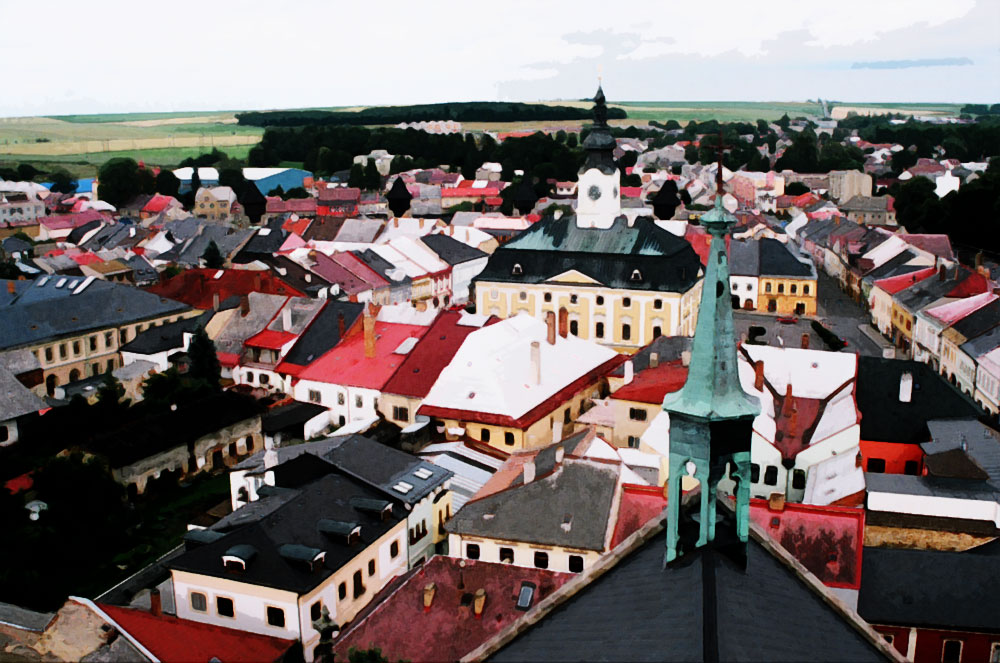
view from the tower in Policka
Policka, Czech Republic
I noticed the clouds disappeared so I may need to tweak some settings.
Clouds are back (I used cutout filter 8,4,2 instead of 4,4,2)

Wednesday, April 17, 2013

Hand Colouring a Black and White Photo

I started with a colour photo.
Original
Remove colour by, either:

Image>Adjustments>Gradient Map>Black to White

b/w

Or, another way to remove colour is by:

Enhance>Adjust Colour>Remove Colour

I find this one more grey than b/w
  • Add a plain New Layer above the photo
  • Use Blend Mode: Colour
  • Paint with orange paintbrush
100% opacity
Here's what it looks like with a reduced opacity:
70% opacity
Of course, I just had to posterize it.

I just love posterizing!